How to Fix a Slow Laptop (and When an Old One Is Worth Speeding Up)
If I had to name the single most common thing people carry through our door, it's a laptop that's gotten slow, not broken, just slow enough that opening a browser feels like a negotiation. I'm Dave, I've run a repair shop in Somerville, NJ since 2011, and this is the same honest walkthrough I give customers at the counter: what actually makes laptops slow, the one thing worth trying yourself, and how to tell whether an older laptop is worth speeding up or genuinely done.
This is the laptop-specific companion to my full guide on how to fix a slow computer. Everything there applies here too, but laptops have a few extra ways to slow down that desktops don't, and they deserve their own checklist.
Why is my laptop so slow?
Laptops slow down for all the usual computer reasons (startup clutter, an aging hard drive, too little memory, malware) plus three that are uniquely laptop problems:
- Heat. Everything in a laptop is packed into a space the thickness of a magazine, cooled by one small fan pulling air through vents that double as lint traps. When dust builds up, temperatures climb and the processor deliberately slows itself down to protect the hardware: it's called thermal throttling, and it's the great unsung cause of "my laptop used to be fast." I wrote a full guide on how to clean a laptop fan if yours sounds like it's preparing for takeoff.
- Power modes. Laptops constantly trade speed for battery life. On battery, most are set to run well below full speed, and sometimes a Windows update or an overzealous battery-saver setting leaves the machine stuck in low-power mode even when it's plugged in. Check Settings > System > Power & battery and see where that slider actually sits.
- A tired battery. This one surprises people: a worn-out battery can force some laptops to cap their own performance, because it can no longer deliver the peak power the processor asks for. If your laptop is slow and the battery barely holds a charge, those two facts may be the same problem.
Underneath those, the usual suspects still apply. A laptop still booting from a spinning hard drive will feel slow no matter what you do in software. Sixteen browser tabs on 4GB of RAM will bring anything to its knees. And a machine that got slow suddenly, over a week, not a year, deserves a malware check before anything else; that's a big part of our virus removal work.
The one fix worth trying yourself
Same advice I give in the main guide, because it's genuinely the highest-value five minutes in computing: clean up what launches at startup.
- Press Ctrl + Shift + Esc to open Task Manager.
- Click the Startup apps tab.
- Disable everything you don't need the moment the laptop turns on. Updaters, game launchers, chat apps, the utility from a printer you no longer own, none of it needs to load at boot. You're not uninstalling anything; the programs still work when you open them.
On a laptop this matters double, because every background process is also generating heat and draining battery, both of which slow you down further. While you're in there, restart the machine properly: a real restart, not closing the lid. Windows' Fast Startup means "shutting down" often isn't the fresh start people assume, and some laptops go weeks without a true reboot.
What I'd skip: registry cleaners, driver-updater utilities, and anything advertising itself as a "PC optimizer." At best they do nothing. At worst they're the reason the laptop comes to see me.
How to speed up an old laptop
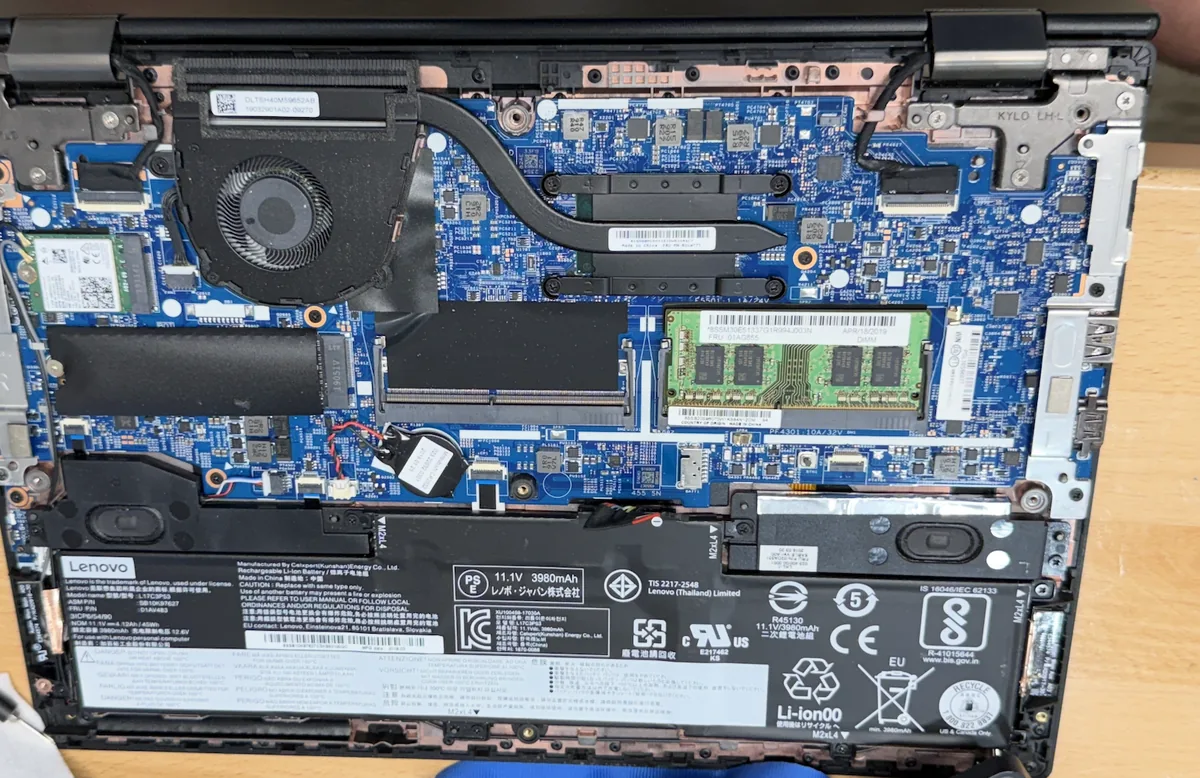
Here's the part most articles get wrong, because most articles are trying to sell you a new laptop. An older laptop that was decently built is very often worth speeding up, and the results aren't subtle.
- Swap the hard drive for an SSD. If the laptop still has a spinning drive, this is the single biggest upgrade in all of computing. Boot times drop from minutes to seconds, programs open instantly, and the whole machine feels new. We do this with a full copy of your files and Windows, so you come back to the same laptop, just fast.
- Add memory, if the laptop allows it. Many older laptops have a memory slot we can upgrade in minutes. Many newer thin models have memory soldered to the board, and no one can upgrade it. This is a two-minute check for us, and it's worth knowing before you spend anything else.
- Clean the cooling and replace the thermal paste. On a laptop that's four or more years old, the fan is dusty and the thermal paste between the processor and its cooler has dried out. Fresh paste and a proper cleaning routinely bring temperatures down 10–20 degrees, which means the processor stops throttling and runs at its actual speed again.
- A clean Windows install. When years of accumulated software are the problem, sometimes the honest fix is a fresh start: files preserved, clutter gone. Paired with an SSD, it's the closest thing to a new laptop without buying one.
Now the honest part: not every laptop deserves this. If the machine has a low-end processor from a decade ago, a failing screen, and a cracked hinge, putting money into it is bad math and I'll say so. The line I use at the counter: if the laptop was good when you bought it, it's usually worth reviving. If it was struggling on day one, upgrades can't fix what was never there. One timing note: if it's an older machine still on Windows 10, read my post on Windows 10 end of support before deciding, the upgrade question and the speed question are usually the same conversation.
Slow laptop on Windows 11
Getting a wave of these lately. If your laptop got slower after moving to Windows 11 or after a big feature update: give it a day (Windows rebuilds its search index and runs maintenance after major updates), check Startup apps again (updates sometimes re-enable things), grab the optional driver updates from Windows Update, and confirm the power mode didn't reset itself to battery-saver defaults. And if the laptop is running Windows 11 on a spinning hard drive, no setting will save it: that's an SSD conversation.
When to bring it in
If the startup cleanup and a real restart didn't move the needle, the cause is one of the things you can't see from a desk chair: a drive that's failing, a thermal problem, malware, or a battery dragging performance down. Guessing gets expensive; measuring doesn't.
At the shop we run a full diagnostic for $75, credited toward the repair if you go ahead with it, so finding out what's actually wrong effectively costs nothing when we fix it. Most slow-laptop repairs are done in a couple of days. Details on the process are on our laptop repair page, or just call 908-428-9558 and describe what it's doing, and after fifteen years I can usually tell you over the phone whether it's worth the trip.
Frequently asked questions
Why is my laptop so slow all of a sudden?
A sudden slowdown (days or weeks, not years) usually means something changed: a new program running in the background, malware, a Windows update that reset settings or is still finishing up, or a drive beginning to fail. Overheating can also appear "suddenly" once dust crosses the point where the fan can't keep up. Sudden slowdowns are worth diagnosing quickly, because two of the causes (a failing drive and malware) get worse the longer they run.
How can I make my old laptop faster?
In order of impact: replace the hard drive with an SSD, add memory if the model allows it, clean the cooling system and refresh the thermal paste, and trim what launches at startup. An SSD alone transforms most older laptops. What doesn't work: optimizer apps, registry cleaners, and deleting random files to "free up space."
Is it worth upgrading an old laptop instead of replacing it?
Usually yes, if it was a well-built machine to begin with. An SSD and a memory bump cost a fraction of a comparable new laptop and remove the two biggest bottlenecks. It stops being worth it when the processor itself is the limit, or when the laptop has multiple failing parts. We tell you which side of that line you're on as part of the diagnostic, before you spend anything on the repair.
Why is my laptop slow even after restarting?
First, make sure it was a true restart: use Restart, not Shut Down, because Windows Fast Startup makes shutdowns partially resume the old session. If a real restart doesn't help, the cause is persistent: startup programs load again every boot, a failing drive is slow every boot, and thermal throttling returns as soon as the machine warms up. That slow-no-matter-what pattern is exactly what a bench diagnostic is for.
And if the laptop mostly lives on a desk anyway, there's one more honest option: a custom-built desktop from our Somerville bench often costs less than a comparable new laptop, and lasts years longer.
Laptop dragging? Bring it by the shop.
Mention code FIRST20 when you drop off your laptop and take $20 off your first repair at Dave's Computers, 75 N Bridge St, Somerville NJ.
Call 908-428-9558: the $75 diagnostic is always credited toward your repair.
Checklist pointing at hardware? See what a RAM upgrade or SSD swap actually involves on our laptop upgrade service page.