CyberPowerPC Repair in New Jersey: Fast, Flat-Rate, No Guesswork
Overheating mid-game? GPU crashing? Won't POST? Dave's Computers in Somerville, NJ has been fixing gaming PCs for over 15 years. We work on CyberPowerPC desktops and laptops: honest flat-rate repair, fast turnaround. Most repairs done in 24–48 hours.
⭐ 4.8 / 5 from 300+ reviews🔧 In business since 2011📍 75 N Bridge St, Somerville NJ
We are not a warranty provider or authorized service center for CyberPowerPC. We are an independent repair shop in Somerville, NJ with 15+ years of experience working on machines from reputable brands like CyberPowerPC. If your computer is out of warranty, we can help. If CyberPowerPC's support allows you to retain your warranty on parts and hire us for labor. Where you pay us directly. That works too. We are not affiliated with, endorsed by, or sponsored by CyberPowerPC.
CyberPowerPC Repairs We Handle in Our NJ Shop
Here's what we fix most often for CyberPowerPC owners in Somerset County and central NJ.
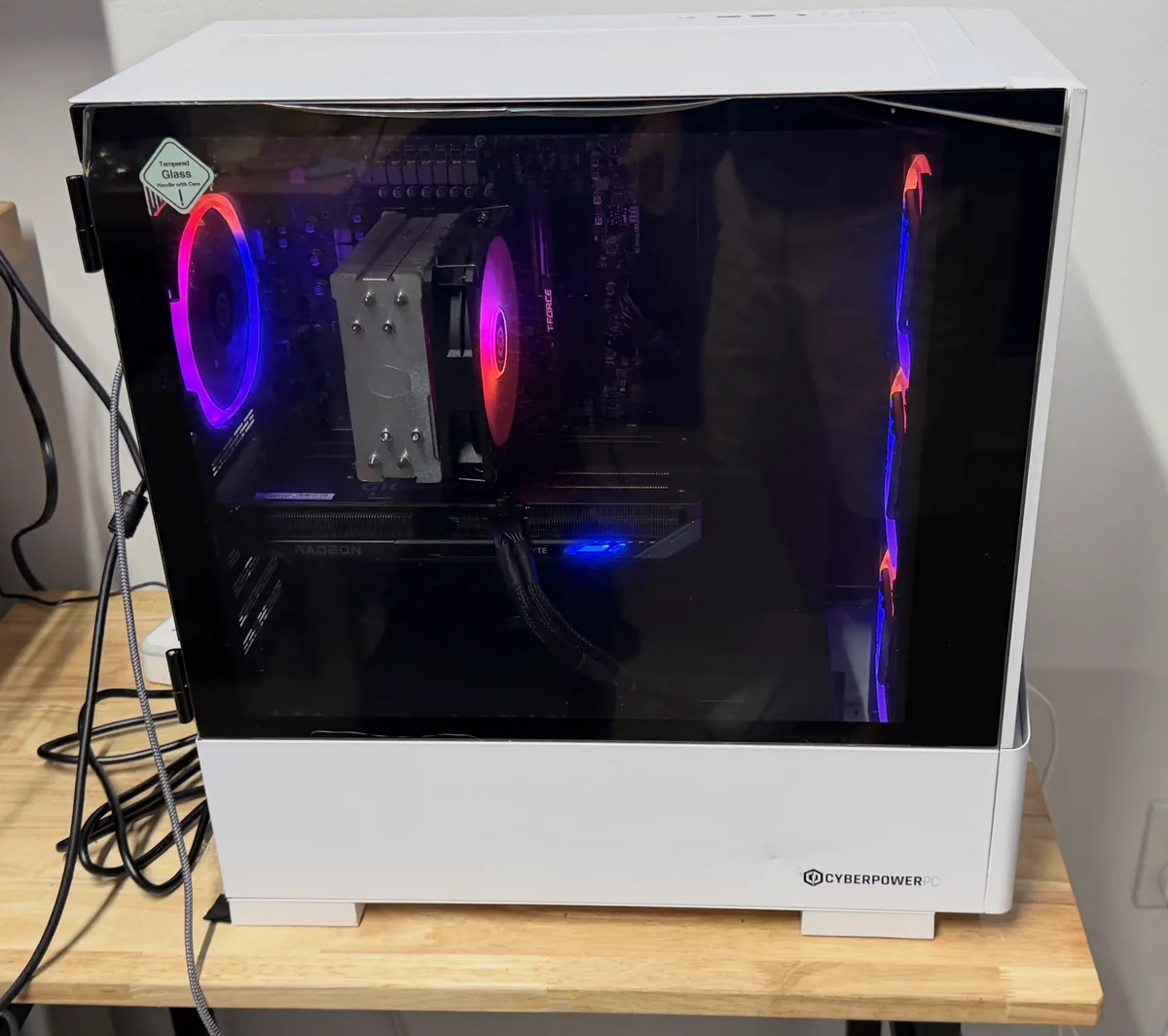
A CyberPowerPC tower in for service on our Somerville bench: tempered glass, RGB, Radeon graphics. Standard fare here.
🌡️
Overheating & Thermal Throttling
CyberPowerPC builds push hardware hard. Thermal paste dries out, fans clog with dust, and radiators lose efficiency. If your PC shuts down mid-game, we clean it out, re-paste the CPU/GPU, and restore full performance.
Visit Us For Free Estimate
🖥️
GPU Crashes & Driver Failures
Black screens, artifacting, driver crashes. GPU issues are the #1 complaint we hear from CyberPowerPC owners in NJ. We bench-test the GPU, isolate whether it's driver, power delivery, or hardware, and give you an honest answer.
Quoted after $75 diagnostic
💾
Storage Upgrade & Replacement
Many CyberPowerPC builds ship with a secondary HDD. Upgrading to NVMe SSD or replacing a failing drive is one of the best investments you can make. We clone your data and have you gaming again fast.
Quoted after diagnostic
⚡
Power Supply Failure
PSU failures in CyberPowerPC builds aren't uncommon after a power surge or years of heavy load. Random shutdowns, no POST, or won't power on. We test the PSU and replace it with a quality unit.
Quoted after $75 diagnostic
🔧
Boot Failures & POST Issues
Won't boot past the logo? No video output? We run full hardware diagnostics to find whether it's RAM, GPU seating, storage, or motherboard, and give you a flat-rate quote to fix it.
$75 diagnostic
🔋
RAM Upgrades & Compatibility
CyberPowerPC systems are often upgradeable. If your machine is running slow or you want more RAM for content creation or streaming, we source compatible modules and install them right.
Quoted after diagnostic
CyberPowerPC Models We Repair Near You in NJ
We service the full CyberPowerPC lineup. Here are the models we see most from Somerset County and central NJ customers.
A quick decoder for the lineup: Gamer Xtreme is the Intel-based desktop line, Gamer Master is its AMD Ryzen counterpart, and Gamer Supreme sits above both with higher-end parts and liquid cooling, which is why Supreme machines are the ones we most often see for radiator and pump service. Tracer is the gaming laptop family. Whatever the badge says, the parts inside are standard, which is exactly why these machines are worth repairing and upgrading instead of replacing.
The Big-Box “Model C Series”
If yours came from a big-box store, the label probably says CyberPowerPC Model C Series: the retail line built in volume for store shelves rather than configured to order. C Series machines get the same bench process as any custom order: full diagnostic, flat-rate quote, honest verdict. The ones we see span everything from the RX 5600 XT era to current RTX builds, and the common thread is a thermal service due around year two or three: the same pattern across every brand on our gaming PC repair page.
RGB, Keyboard Lights, and the Software Side
A surprising share of CyberPowerPC issues are not hardware at all: keyboard colors stuck after a Windows update, case lighting that ignores the remote, fan-control software that vanished after a reinstall. When the lighting on the keyboard or the case stops responding to its controls, the control software itself is usually the repair. We restore it as part of a standard tune-up.
CyberPowerPC Repair Pricing in New Jersey
Flat-rate pricing after a $75 diagnostic. No hourly clock. No surprises.
🔍 Diagnostic (credited toward repair)$75
🌡️ Thermal Service (paste + cleaning)Visit Us For Free Estimate
🖥️ Screen Replacement (laptop models)$180 – $275
💾 SSD / NVMe Upgrade + Data MigrationQuoted after diagnostic
⚡ Power Supply ReplacementQuoted after diagnostic
🖥️ GPU Diagnostic & RepairQuoted after diagnostic
📂 Data RecoveryStarting at $199
All prices are estimates. Final quote given after diagnostic. The $75 diagnostic fee is credited toward your repair if you proceed.
Why NJ CyberPowerPC Owners Choose Dave's Over the Big Box Stores
Big box stores ship your machine out. We fix it here, in our Somerville shop, on our bench.
😬 Big Box / Mail-In
What You Usually Get
📦
Your machine ships to a regional center. Turnaround is 1–3 weeks, sometimes longer
❓
Different person every call. Nobody actually knows your repair or your machine
💸
Hourly rates with no cap: you don't know what you'll pay until the invoice arrives
🔁
Same issue back a month later: surface-level fixes, not root cause diagnosis
📵
No direct line to the tech: customer service reps reading from scripts
✅ Dave's Computers
What You Get Here
⚡
Most repairs done in 24–48 hours, fast diagnosis, fast fix
🤝
Same tech from drop-off to pickup: one person, one repair, no handoffs
💰
Flat-rate quote after diagnostic. You approve it before we start, no surprises
🔬
We bench-test the full system, not just the obvious symptom, so it stays fixed
📞
Call (908) 428-9558 and talk to the person actually working on your machine
CyberPowerPC Repair You Can Actually Trust in NJ
Here's what 15 years of fixing computers in Somerset County has taught us.
🔬
We Diagnose First, Always
We run a full diagnostic before recommending anything. We find the actual cause, not just the first obvious symptom.
💰
Flat-Rate, No Hourly Clock
You get a firm quote before we start. The $75 diagnostic gets credited to your repair. No watching a clock tick.
⚡
Fast Turnaround
Most repairs diagnosed within 24 hours, completed within 48. We stock parts for common repairs to avoid shipping delays.
🛡️
Honest Recommendations
If the repair costs more than the machine is worth, we'll tell you. No upselling on things you don't need.
📍
Local Since 2011
We've been at 75 N Bridge St, Somerville NJ for over a decade. No 800 number, no ticket system, no runaround.
🔒
Your Machine Stays Here
Your computer never leaves our shop. No shipping to a warehouse. Repaired on our bench, handed back to you.
CyberPowerPC Repair FAQs: New Jersey
The questions we get most from NJ customers looking for CyberPowerPC repair near them.
How much does CyberPowerPC computer repair cost near me in NJ?
Diagnostics are $75, credited toward your repair if you proceed. After that everything is flat-rate, you get a firm quote before we start any work. Stop in any time at our Somerville shop, no appointment needed.
How long does CyberPowerPC repair take in New Jersey?
Most systems are diagnosed within 24 hours of drop-off, and repairs completed within 24–48 hours after you approve the quote. Upgrades like SSD swaps are often same-day.
My CyberPowerPC won't turn on at all. What's wrong?
Could be a dead PSU, a failed motherboard, a blown fuse, or a loose power connection, each is a very different fix. Bring it in and we'll run the full test for $75, credited to your repair if you proceed.
Is it worth repairing my CyberPowerPC or should I just buy new?
A GPU replacement or thermal service on a 3-year-old CyberPowerPC system is almost always worth it. A motherboard failure on an 8-year-old entry build may not be. We'll tell you straight after the diagnostic.
My CyberPowerPC shuts down during games. What's causing it?
Thermal shutdown is the most common culprit, especially on systems 2+ years old. Dust buildup and dried thermal paste prevent the CPU and GPU from cooling properly. We also test the power supply, since a failing PSU can cause the same symptom.
The GPU in my CyberPowerPC is crashing. Do I need a new card?
Not always. GPU crashes can be caused by driver issues, inadequate power delivery, overheating, or actual hardware failure. We run the full battery of tests before recommending anything, sometimes it's a $0 driver fix.
What areas near me in NJ do you serve for CyberPowerPC repair?
Our Somerville shop serves Somerset County and central NJ: Bridgewater, Hillsborough, Raritan, Bound Brook, Manville, Warren, Franklin Township, Edison, and beyond. Customers also reach us from Somerset and surrounding towns.
What is the shark fin thing that comes with a CyberPowerPC?
That mysterious fin is your Wi-Fi antenna, and Wi-Fi is weak or missing entirely until it is installed correctly. If your new machine cannot find your network or the Wi-Fi is unreliable, bring it in and we will sort it out as part of a new computer setup.
How do I change the keyboard colors or RGB on my CyberPowerPC?
If the keyboard or case lighting stopped responding after a Windows update or reinstall, the control software is usually the fix. That is a quick software repair at the bench, not a hardware problem.
Is CyberPowerPC a good brand?
From a bench that repairs every prebuilt brand: yes, with a caveat. The components are standard, name-brand parts, which makes these machines genuinely repairable and upgradeable. What we fix most is not bad parts but volume-build realities: thermal paste due for renewal by year two or three, dust, and software load. A CyberPowerPC that gets a periodic tune-up is a machine with a long life ahead of it.
My new CyberPowerPC will not start up the first time. What should I check?
Don't panic. A brand-new tower that shows nothing on the screen is almost always a first-day setup issue rather than a defect, and shipping can also loosen the graphics card or memory in transit. We set up and test first-boot machines every week; bring it in with the monitor cable and it's usually a quick visit.
Does independent repair void my CyberPowerPC warranty?
If your machine is still under CyberPowerPC warranty, use their support first for covered defects. We will tell you the same at the counter. Under US law, a warranty cannot be voided simply because an independent shop opened or upgraded the machine, but defect claims belong with the manufacturer while coverage lasts. Once you are out of warranty, we are the faster, local option.
Can I upgrade my prebuilt CyberPowerPC?
Almost always yes, and that is one of the brand’s genuine strengths: unlike some big-name prebuilts, these use largely standard parts. RAM, storage, graphics cards, and power supplies are routine upgrades on our bench. The one thing we always verify before a GPU upgrade is power supply headroom. Dropping a hungrier card onto an original PSU is how upgrades turn into repairs.
CyberPowerPC vs iBUYPOWER. Which is more reliable?
We repair both, and honestly they are more alike than different: similar component pools, similar build approach, and the same failure patterns. Thermals first, power supplies second, software load third. Choose on configuration, price, and warranty terms rather than brand mythology. Whichever you own, the bench treats them the same; we also have a dedicated iBUYPOWER repair page.
How do I factory reset my CyberPowerPC, and should I?
Windows has a built-in reset, but it erases your files, so back them up first. And if you are resetting to cure slowness, crashes, or shutdowns, diagnose before you wipe: resets do not fix failing drives, dried thermal paste, or a struggling power supply, and losing your data to a reset that changes nothing is the worst outcome in computing.
How do I set up a new CyberPowerPC out of the box?
There are a few things that have to happen before first power-on, including removing the shipping protection inside the case and getting the antenna and display connected correctly, and then Windows setup begins. Rather skip all of it? We do complete new computer setup and data transfer, so it comes home ready.
How do I remove the side or glass panel on my CyberPowerPC?
Most CyberPowerPC cases have a tempered glass side panel, and a cracked panel from a slip is a repair I see too often, so I'd rather you didn't. What is usually inside is the real repair: dust. If the heatsinks look like felt, that is a thermal service, and it is the single most common job we do on this brand.
How do I enable Secure Boot on a CyberPowerPC for Windows 11 or Valorant?
Games with kernel anti-cheat (Valorant especially) and Windows 11 both demand Secure Boot, and on many CyberPowerPC builds it ships turned off. Turning it on involves firmware settings that, done in the wrong order or on the wrong disk layout, can leave the machine unbootable. It is a quick, safe bench job for us and a bad afternoon to guess through.
What motherboard does CyberPowerPC use, and does it matter for upgrades?
There is no single answer: builds use standard retail boards from the major manufacturers, and the exact model varies by configuration and year. We identify yours as part of the diagnostic. It matters because the board decides your RAM generation, storage slots, and upgrade ceiling, which is why we verify the board and power supply headroom before quoting any upgrade.
How do I control the CK60 keyboard, or turn the keyboard and mouse lights on or off?
If the lighting controls on the bundled keyboard or mouse stopped responding after a Windows update or reinstall, the control software is what broke, and restoring it is part of a standard tune-up here.
Should I contact CyberPowerPC support or a local repair shop?
Honest routing: if the machine is under warranty with a genuine defect, start with CyberPowerPC support. The company is based in City of Industry, California, so factory service means an RMA, shipping both ways, and their queue. If the machine is out of warranty, the problem is urgent, or the data on it matters to you, a local bench wins on every axis: no shipping, days instead of weeks, and your drive never leaves Somerville.
Find CyberPowerPC Repair Near You: Our Somerville NJ Shop
One location serving all of Somerset County and central New Jersey. Free parking. No appointment needed.
,"mainEntity":[
{"@type":"Question","name":"How much does CyberPowerPC computer repair cost near me in NJ?","acceptedAnswer":{"@type":"Answer","text":"Diagnostics are $75, credited toward your repair if you proceed. After that everything is flat-rate, you get a firm quote before we start any work. Stop in any time at our Somerville shop, no appointment needed."}},
{"@type":"Question","name":"How long does CyberPowerPC repair take in New Jersey?","acceptedAnswer":{"@type":"Answer","text":"Most systems are diagnosed within 24 hours of drop-off, and repairs completed within 24–48 hours after you approve the quote. Upgrades like SSD swaps are often same-day."}},
{"@type":"Question","name":"My CyberPowerPC won't turn on at all. What's wrong?","acceptedAnswer":{"@type":"Answer","text":"Could be a dead PSU, a failed motherboard, a blown fuse, or a loose power connection, each is a very different fix. Bring it in and we'll run the full test for $75, credited to your repair if you proceed."}},
{"@type":"Question","name":"Is it worth repairing my CyberPowerPC or should I just buy new?","acceptedAnswer":{"@type":"Answer","text":"A GPU replacement or thermal service on a 3-year-old CyberPowerPC system is almost always worth it. A motherboard failure on an 8-year-old entry build may not be. We'll tell you straight after the diagnostic."}},
{"@type":"Question","name":"My CyberPowerPC shuts down during games. What's causing it?","acceptedAnswer":{"@type":"Answer","text":"Thermal shutdown is the most common culprit, especially on systems 2+ years old. Dust buildup and dried thermal paste prevent the CPU and GPU from cooling properly. We also test the power supply, since a failing PSU can cause the same symptom."}},
{"@type":"Question","name":"The GPU in my CyberPowerPC is crashing. Do I need a new card?","acceptedAnswer":{"@type":"Answer","text":"Not always. GPU crashes can be caused by driver issues, inadequate power delivery, overheating, or actual hardware failure. We run the full battery of tests before recommending anything, sometimes it's a $0 driver fix."}},
{"@type":"Question","name":"What areas near me in NJ do you serve for CyberPowerPC repair?","acceptedAnswer":{"@type":"Answer","text":"Our Somerville shop serves Somerset County and central NJ: Bridgewater, Hillsborough, Raritan, Bound Brook, Manville, Warren, Franklin Township, Edison, and beyond. Customers also reach us from Somerset and surrounding towns."}},
{"@type":"Question","name":"What is the shark fin thing that comes with a CyberPowerPC?","acceptedAnswer":{"@type":"Answer","text":"That fin is the Wi-Fi antenna, and Wi-Fi is weak or missing entirely until it is installed correctly. If your new machine cannot find your network or the Wi-Fi is unreliable, bring it in and we will sort it out as part of a new computer setup."}},
{"@type":"Question","name":"How do I change the keyboard colors or RGB on my CyberPowerPC?","acceptedAnswer":{"@type":"Answer","text":"If the keyboard or case lighting stopped responding after a Windows update or reinstall, the control software is usually the fix. That is a quick software repair at the bench, not a hardware problem."}},
{"@type":"Question","name":"Is CyberPowerPC a good brand?","acceptedAnswer":{"@type":"Answer","text":"From a bench that repairs every prebuilt brand: yes, with a caveat. The components are standard name-brand parts, which makes these machines repairable and upgradeable. What we fix most is not bad parts but volume-build realities: thermal paste due by year two or three, dust, and software load."}},
{"@type":"Question","name":"My new CyberPowerPC will not start up the first time. What should I check?","acceptedAnswer":{"@type":"Answer","text":"A brand-new tower that shows nothing on the screen is almost always a first-day setup issue rather than a defect, and shipping can also loosen the graphics card or memory in transit. We set up and test first-boot machines every week; bring it in with the monitor cable."}},
{"@type":"Question","name":"Does independent repair void my CyberPowerPC warranty?","acceptedAnswer":{"@type":"Answer","text":"If the machine is under CyberPowerPC warranty, use their support first for covered defects. Under US law a warranty cannot be voided simply because an independent shop opened or upgraded the machine, but defect claims belong with the manufacturer while coverage lasts. Out of warranty, we are the faster local option."}},
{"@type":"Question","name":"Can I upgrade my prebuilt CyberPowerPC?","acceptedAnswer":{"@type":"Answer","text":"Almost always yes. These builds use largely standard parts, so RAM, storage, graphics cards, and power supplies are routine upgrades on our bench. We always verify power supply headroom before a GPU upgrade, because a hungrier card on the original PSU is how upgrades turn into repairs."}},
{"@type":"Question","name":"CyberPowerPC vs iBUYPOWER, which is more reliable?","acceptedAnswer":{"@type":"Answer","text":"We repair both and they are more alike than different: similar component pools and the same failure patterns, thermals first, power supplies second, software load third. Choose on configuration, price, and warranty terms rather than brand mythology."}},
{"@type":"Question","name":"How do I factory reset my CyberPowerPC, and should I?","acceptedAnswer":{"@type":"Answer","text":"Windows has a built-in reset, but it erases your files, so back them up first. If you are resetting to cure slowness, crashes, or shutdowns, diagnose before you wipe: resets do not fix failing drives, dried thermal paste, or a struggling power supply."}},
{"@type":"Question","name":"How do I set up a new CyberPowerPC out of the box?","acceptedAnswer":{"@type":"Answer","text":"A few things have to happen before first power-on, including removing the shipping protection inside the case and getting the antenna and display connected correctly. We offer complete new computer setup and data transfer so none of it is on you."}},
{"@type":"Question","name":"How do I remove the side or glass panel on my CyberPowerPC?","acceptedAnswer":{"@type":"Answer","text":"Most CyberPowerPC cases have a tempered glass side panel, and a cracked panel from a slip is a repair I see too often. Heavy dust inside is the usual finding, and it means the machine is due for thermal service."}},
{"@type":"Question","name":"How do I enable Secure Boot on a CyberPowerPC for Windows 11 or Valorant?","acceptedAnswer":{"@type":"Answer","text":"On many CyberPowerPC builds Secure Boot ships turned off. Turning it on involves firmware settings that, done in the wrong order or on the wrong disk layout, can leave the machine unbootable, so it is a quick, safe bench job for us."}},
{"@type":"Question","name":"What motherboard does CyberPowerPC use, and does it matter for upgrades?","acceptedAnswer":{"@type":"Answer","text":"Builds use standard retail boards from the major manufacturers, and the exact model varies by configuration and year. We identify yours as part of the diagnostic. The board decides your RAM generation, storage slots, and upgrade ceiling, so we verify it before quoting any upgrade."}},
{"@type":"Question","name":"How do I control the CK60 keyboard, or turn the keyboard and mouse lights on or off?","acceptedAnswer":{"@type":"Answer","text":"If the lighting controls on the bundled keyboard or mouse stopped responding after a Windows update or reinstall, the control software is what broke, and restoring it is part of a standard tune-up here."}},
{"@type":"Question","name":"Should I contact CyberPowerPC support or a local repair shop?","acceptedAnswer":{"@type":"Answer","text":"If the machine is under warranty with a genuine defect, start with CyberPowerPC support; the company is based in City of Industry, California, so factory service means an RMA and shipping both ways. Out of warranty, or when the problem is urgent or the data matters, a local bench is faster and your drive never leaves Somerville."}}
]}
Ready to Get Your CyberPowerPC Fixed?
Drop it off at our Somerville shop. We'll diagnose it, give you a flat-rate quote, and have it back to you fast. No shipping. No strangers. No surprises.