Air vs Liquid Cooling for Custom PC:
Choosing Between Air Cooling and Liquid
Cooling for Gaming Performance
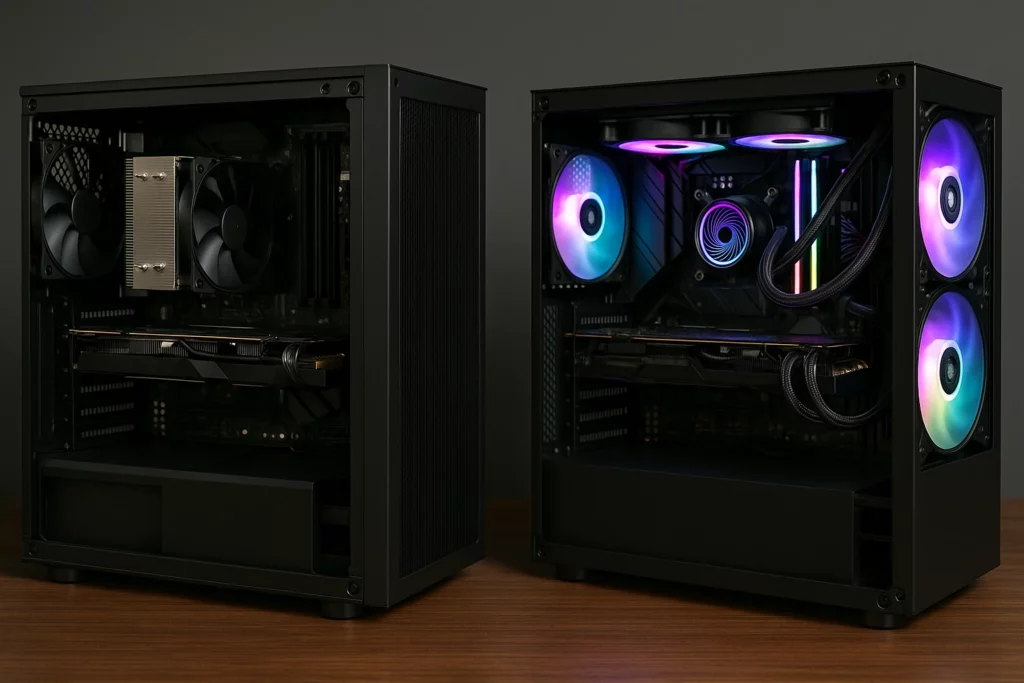
When building a custom gaming PC custom pc build NJ, choosing between air and liquid cooling has a big impact on performance, noise, and longevity. Each cooling system has its strengths, and the right choice depends on your hardware setup, budget, and gaming goals. Whether you're focused on frame rates, quiet operation, or aesthetics, understanding the pros and cons of air vs liquid cooling for custom pc setups helps you make the right call. At Dave’s Computers, we break it down to help you find the best cooling solution for your next build. No guesswork, just reliable advice tailored to your needs.
Why Cooling Matters for Custom Gaming PCs
Gaming PCs mistakes to avoid when building a custom pc run hot, especially under load. Modern CPUs and GPUs can reach high temperatures during extended gaming sessions. Without a reliable cooling system, that heat can slow down performance, cause crashes, or even damage components over time.
Effective cooling keeps your system stable and responsive. It helps prevent thermal
throttling, where the CPU or GPU slows down to avoid overheating. Whether you're playing
graphically intense games or multitasking with heavy applications, your cooler plays a big
role in how smooth your experience feels.
Air Cooling: Affordable and Straightforward
Air coolers are the go-to choice for many gamers, and for good reason. These systems use
a heatsink and one or more fans to move heat away from the CPU and out of the case.
Benefits of air cooling:
- Cost-effective: Great performance for a lower price.
- Simple installation: No need to deal with tubes or pumps.
- Reliable: Fewer parts mean fewer things that can go wrong.
- Low maintenance: Just keep the fans and heatsink free of dust.
Modern air coolers have come a long way. Many use copper heat pipes, aluminum fins, and
high-efficiency fans that keep temperatures low even during intense sessions. For standard
to mid-range builds, air cooling is often more than enough.
However, air coolers can be bulky and may not fit in compact cases. They also tend to be
louder when working hard compared to liquid systems.
Liquid Cooling: Performance and Visual Appeal
Liquid cooling uses water or coolant to move heat away from the CPU. The heat travelsthrough tubes to a radiator, where fans push it out of the system. This type of cooling is
known for both performance and aesthetics.
Why choose liquid cooling:
- Lower temperatures: Ideal for overclocking or high-performance builds.
- Quieter operation: Radiators and larger fans often run more quietly.
- Better heat distribution: Great for cooling more than one component.
- Clean look: All-in-one (AIO) liquid coolers offer sleek design options
Custom liquid cooling setups allow users to cool the CPU, GPU, RAM, and even storage
devices with one loop. These systems also offer flexibility in radiator placement and support
visual customizations like RGB lighting and colored coolants.
The trade-offs? Higher costs, more complicated installation, and occasional maintenance.
You'll need to monitor coolant levels and check for leaks. For users who want the best
performance and don’t mind the extra care, liquid cooling delivers impressive results.
Custom Watercooling: Maximum Control, Maximum Impact
For serious builders, custom watercooling systems offer total control over thermal
performance and style. Unlike AIO units, these setups are fully modular. Users choose their
own pumps, radiators, reservoirs, and blocks.
Advantages of custom watercooling:
- Targeted cooling: Cool multiple components at once.
- Ultra-low noise: Larger radiators mean fans don’t need to work as hard.
- Extreme performance: Keeps temperatures in check during overclocking.
- Standout aesthetics: A clear case with glowing coolant turns heads.
That said, this option is best for experienced builders or users working with an expert like
Dave’s Computers. We’ve helped many customers build custom loops that look great and
perform even better.
How to Choose the Right Cooler for Your Build
Choosing between air and liquid cooling isn’t just about looks. Your decision affects system performance, upgrade flexibility, and long-term reliability. Here’s what to weigh when picking the best cooler for your custom PC how to install windows on a new pc build.
1. Performance Requirements
If your build includes a high-wattage CPU, powerful GPU, or you plan to overclock, liquid cooling might be the better fit. It handles thermal loads more efficiently, helping components perform at their best. On the other hand, if you're gaming at 1080p or not pushing your hardware to its limits, a high-quality air cooler can manage heat just fine.
2. Case Compatibility
Some mid-tower and mini-ITX cases can’t accommodate large air coolers or triple-fan radiators. Always check clearance specs before choosing. Liquid coolers, especially AIOs, often fit into tighter spaces but still require radiator mount points.
3. Noise and Aesthetics
Air coolers can get noisy under load. Liquid systems often run quieter and give a cleaner look, especially those with RGB or colored coolant for extra style.
4. Maintenance and Longevity
Air coolers need occasional dusting. Liquid coolers need pump checks and, in custom loops, coolant changes. If you want set-it-and-forget-it, air cooling is easier to live with.
At Dave’s Computers, we can walk you through all of these factors and help you find the ideal solution, whether it’s an ultra-quiet air cooler or a high-performance liquid system that keeps your PC cool under pressure.