Battlefield 6 PC Requirements — and What I’d Actually Build for It in New Jersey
Battlefield 6 is the game I get asked about most at the counter right now, and it's also the game that's exposed more marginal PCs than anything since Cyberpunk. The good news: EA published unusually honest system requirements, with performance targets at native resolution instead of hiding behind upscalers. The less good news: the anti-cheat requirements alone are stopping machines that would otherwise run the game fine.
The official Battlefield 6 PC requirements
These are EA's published tiers, and they held steady from the beta through launch:
- Minimum (1080p / 30fps / Low): Intel Core i5-8400 or AMD Ryzen 5 2600, 16GB RAM, and an Nvidia RTX 2060, AMD RX 5600 XT, or Intel Arc A380. 55GB storage.
- Recommended (1440p / 60fps / High, or 1080p / 80+fps): Core i7-10700 or Ryzen 7 3700X, 16GB RAM, RTX 3060 Ti or RX 6700 XT, 90GB on an SSD.
- Ultra (4K / 60fps Ultra, or 1440p / 144fps): Core i9-12900K or Ryzen 7 7800X3D, 32GB dual-channel RAM, RTX 4080 or RX 7900 XTX with 16GB VRAM.
- Ultra++ (4K / 144fps High with DLSS, or 4K / 240fps+ Ultra with Multi Frame Generation): Core Ultra 9 285K or Ryzen 7 9800X3D and an RTX 5080. Notably, EA lists no AMD card at this tier.
Per PC Gamer's coverage, every tier below Ultra++ is a native-resolution target: the developers deliberately built the game to run well without leaning on upscaling, though DLSS 4, FSR 4, and XeSS 2 are all supported if you want the extra frames.
The requirement nobody reads until the game won't launch
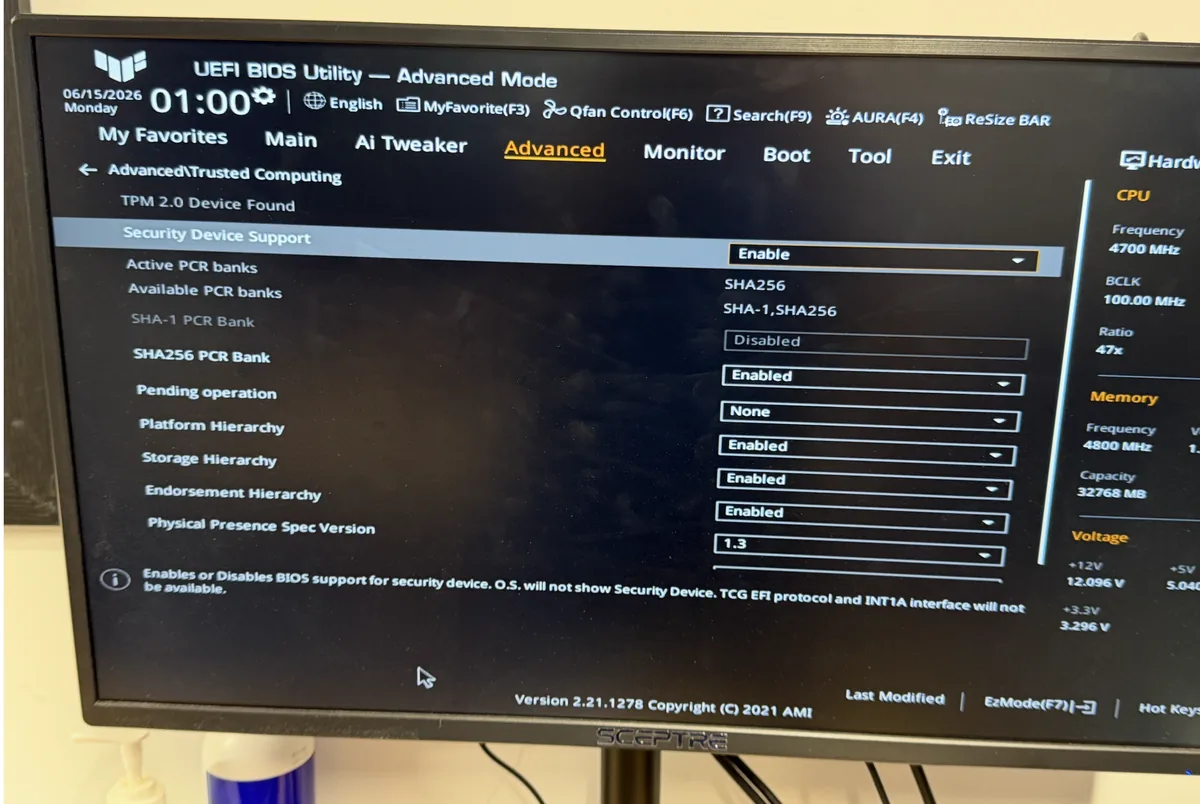
Battlefield 6's Javelin anti-cheat requires TPM 2.0 and Secure Boot enabled. Not installed: enabled. I've had machines come through the shop that meet the hardware spec comfortably and still can't get into a match because Secure Boot was switched off years ago, or the board is running legacy BIOS mode instead of UEFI. If your PC was built before 2018 or Windows was installed in MBR/legacy mode, this is very likely your problem, and flipping the switch without preparation can leave Windows unbootable. That's a fifteen-minute fix done correctly and a lost weekend done wrong; if you're not sure which side of that line you're on, bring the tower in.
What I'd actually build for it in 2026
Here's where the official specs meet the real market. The RTX 4080 and RX 7900 XTX listed at the Ultra tier are last-generation cards that are drying up at retail, and their replacements are caught in this year's memory-driven price squeeze: TechSpot's regional pricing data shows RTX 50-series street prices up an average of 19% in three months, with the RTX 5070 Ti nearly vanishing from shelves. Tom's Hardware's mid-2026 GPU guide still rates the RTX 5060 as the 1080p pick and gave the RX 9060 XT 16GB its Editor's Choice for 1440p value, and both of those clear the game's Recommended tier with room to spare.
One thing I'll say from my own bench rather than anyone's spec sheet: I've diagnosed multiple RDNA 4 cards with driver-timeout crashes specifically in Battlefield 6: a machine that's flawless in everything else, hard-crashing in this one game. It's a driver-maturity issue, not broken hardware, and it's fixable with the right driver and BIOS combination. If your rig meets spec and BF6 still crashes, that's exactly the kind of thing my gaming PC repair service untangles for a $75 diagnostic, credited toward the fix.
For a fresh build: a Ryzen 7 9800X3D, 32GB of DDR5, a 16GB-VRAM card matched to your monitor, and a 2TB NVMe drive covers the 90GB install plus the 80GB REDSEC battle royale without juggling. I build it, stress it for 24–48 hours, confirm Secure Boot and TPM are configured so Javelin is happy on first boot, and hand it over ready to queue.
Want it built right the first time?
I've been doing custom PC builds in New Jersey since 2011: no bloatware, quality parts I'd put in my own machine, and a straight answer about what your budget actually buys in this market. Start with a build quote and consult, or call (908) 428-9558. Drop-offs welcome at 75 N Bridge St in Somerville, behind Bank of America.