Why July Is My Busiest Month for Overheating Laptops and PCs in New Jersey
Every trade has its season. Roofers get spring. Plumbers get the first freeze. Computer repair in New Jersey gets July. Machines that limped along all spring hit their first 95-degree week and give up, and for a couple of weeks my bench fills with the same patient: hot, loud, and shutting down at the worst possible moment. Here's what summer heat actually does inside a computer, what a real fix looks like, and the one July-specific danger most people don't know about.
The symptoms, in the order people notice them
- Fans running at jet-engine volume for tasks that used to be silent.
- A palm rest or keyboard that's uncomfortably hot, or a desktop blowing warm air like a space heater.
- Games and video calls that start fine and fall apart after twenty minutes: stuttering, frame drops, choppy audio. That's thermal throttling: the machine deliberately slowing itself to survive.
- Random shutdowns or restarts under load. That's not a quirk: it's the emergency cutoff, the computer's last line of defense before hardware damage.
What's actually happening inside
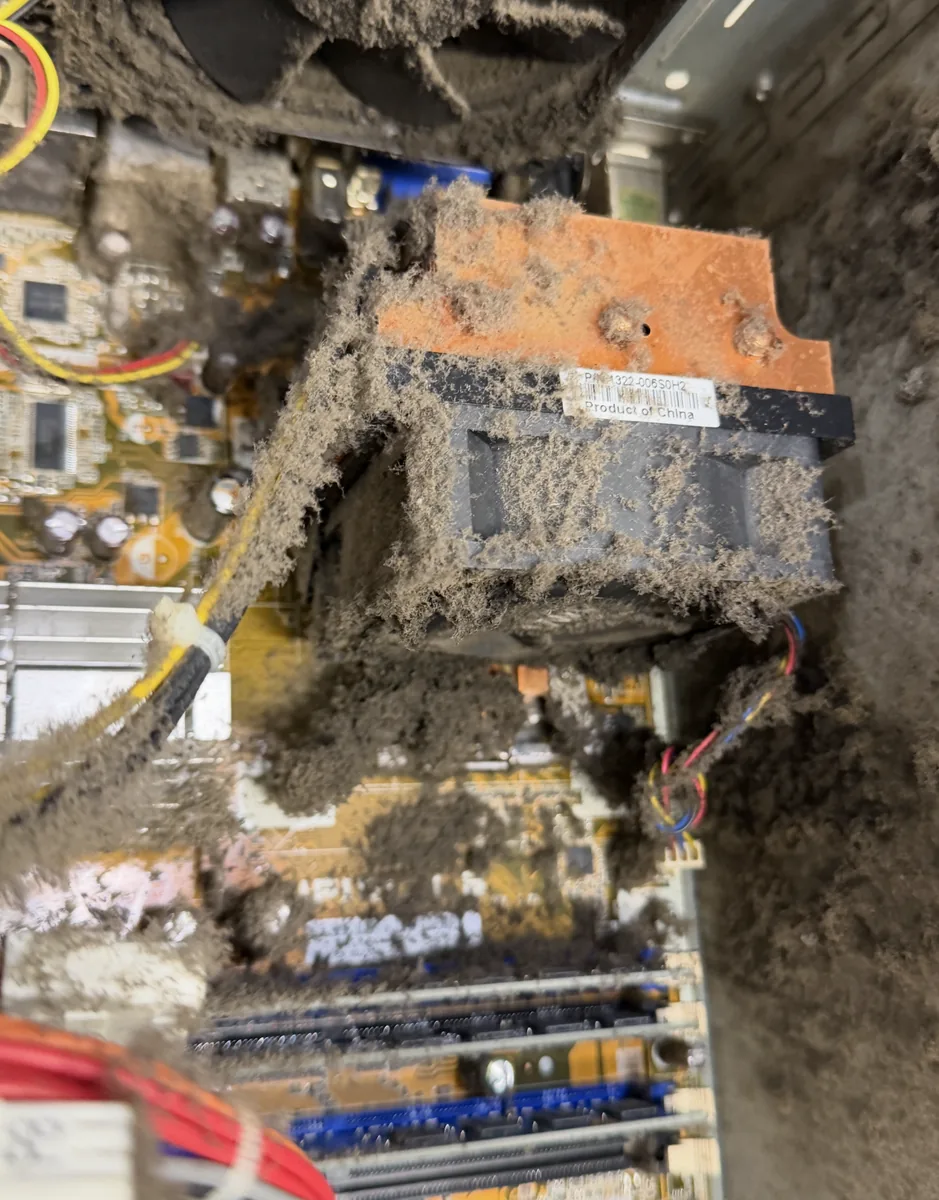
Open up a three-year-old laptop that's never been serviced and you'll almost always find the same thing: a felt-like mat of dust packed between the fan and the cooling fins. The fan spins, air moves, and none of it gets through: the machine is wearing a blanket. Add thermal paste that's dried to chalk (its normal fate after three or four years), maybe a fan bearing that's wearing out, and a computer that survived April can't survive July, when the air it's pulling in starts 20 degrees warmer.
Laptops used on beds, couches, and laps make it worse by sealing their own intake vents against fabric. Desktops have their own versions: a graphics card wearing a dust sweater, case fans that quietly died years ago, or a tower shoved into a closed cabinet with nowhere to exhaust.
Why canned air isn't the fix
Blasting compressed air into the vents feels productive, but on a laptop it mostly packs that dust mat in deeper and spins the fan far past its rated speed. A proper thermal service means opening the machine: fan comes out, the fin stack gets cleaned from the correct side, old paste comes off the CPU and GPU, fresh paste goes on, and everything is reassembled and tested under load. On desktops it's a full interior cleaning, heatsink and card dusting done right, dead fans replaced, and a sanity check on airflow. It's not glamorous work, but the before-and-after temperatures are routinely 20–30 degrees apart: the difference between a machine that throttles and one that just works.
The July danger nobody warns you about: the hot car
The inside of a car parked in a New Jersey July sun can pass 130°F. Lithium batteries hate that. Heat accelerates the chemistry that makes batteries swell, and a swollen battery physically pushes on whatever's above it. If your trackpad has developed a bulge, your keyboard deck is bowing, or the case doesn't sit flat anymore, stop charging it and get it looked at now. A swollen battery is a this-week repair, not a someday repair, and it's cheap compared to what it damages if ignored. Rule of thumb for the season: the laptop rides in the cabin with you, not the trunk, and never gets left in a parked car.
Prevention that actually works
- Hard, flat surfaces: a $20 laptop stand pays for itself in fan life.
- Keep desktop towers out of enclosed cabinets and off thick carpet.
- Mind the window: direct afternoon sun on a laptop adds a real thermal load.
- If the fans have gotten louder every month, that's the machine asking for a cleaning before it starts shutting down.
When it's time to bring it in
Shutdowns, throttling, a burning-hot chassis, or any sign of battery swelling: that's bench time. It's a drop-off at my Somerville shop, and thermal jobs usually turn around quickly. The shop pulls people from a wide radius this time of year; every July I meet customers who searched for computer repair in North Jersey and made the short drive down 287, because a proper thermal rebuild costs a fraction of replacing a machine that's otherwise perfectly good. And for my business clients: if the office machines are cooking in a warehouse or a storefront with the AC fighting for its life, that falls under PC support in NJ and I'll come to you.
If your computer sounds like it's about to take off, call 908-428-9558 or just bring it by 75 N Bridge St in Somerville. Let's get it through the summer.