On Our Bench: ASUS ROG Gaming Laptop With an i9-14900HX Crashing and Overheating (NJ)
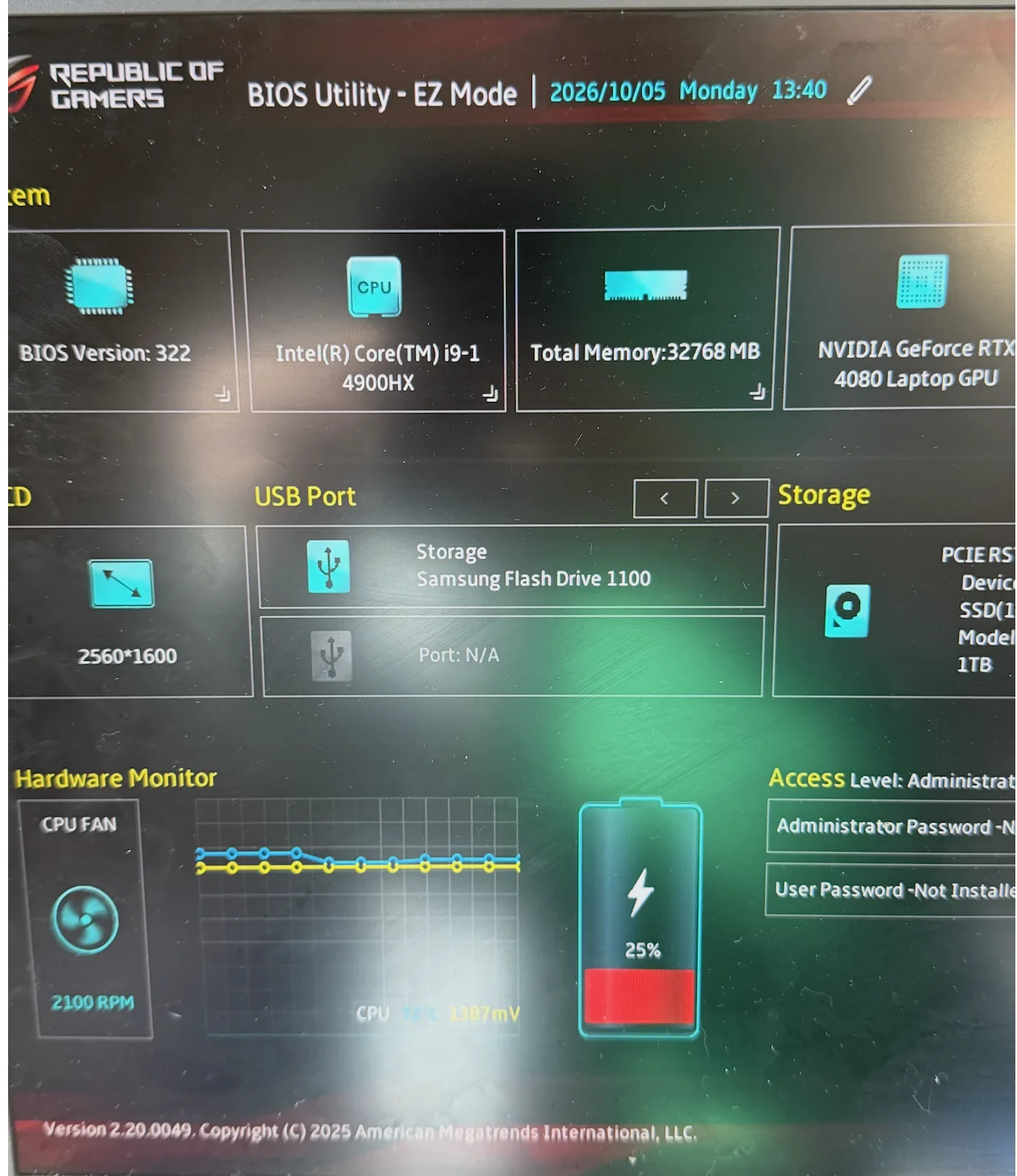
A real repair from the bench at Dave's Computers in Somerville, NJ. An ASUS Republic of Gamers laptop kept crashing in Windows. The BIOS screen alone told us something was wrong before Windows ever loaded.
What came in
A customer brought in their ASUS ROG (Republic of Gamers) gaming laptop because it kept crashing. It would power on, Windows would load, and then it would crash.
How we tracked it down
- Checked the BIOS first. Before Windows even gets involved, the BIOS shows what the hardware is doing on its own. This laptop was running an Intel Core i9-14900HX, and the CPU temperature was really high for a machine sitting idle in the BIOS screen with nothing running. That was the first red flag.
- Tested the RAM and SSD. Both checked out as good, so the crashing was not coming from the memory or the drive.
- Tried a clean Windows install on new parts. To rule out the existing Windows install completely, we put a new drive and new RAM in the laptop and started a fresh Windows install. It crashed with a KMODE blue screen during Windows setup.
The fix, and our recommendation
In a laptop the processor is soldered to the motherboard, so the repair is a new motherboard. See our motherboard replacement service for how that works. On a high-end gaming laptop like this, though, a new board is a big part of the cost of the machine, and my honest recommendation is to put that money toward a new PC instead.
Our take: skip the i9 in a gaming laptop
This is one we see over and over. When a failing gaming laptop comes into our shop, about 90% of the time it has an Intel Core i9. We see 2 to 3 year old i9 laptops fail too quickly. I rarely get in failing i7 gaming laptops; it is the upper-end processor models. My take is that the i9, even in its laptop form, simply runs too hot for the tight space inside a laptop.
- Buying a gaming laptop? Stick with an Intel Core i5, Core i7, or an AMD processor.
- Want an i9? Get a desktop, period. A desktop has the room and the cooling to handle it. Our custom PC build consultation is a good place to start.
Gaming laptop crashing or running hot? It starts with a computer diagnostic so you know exactly what is failing before you spend money. Everything we do for these machines is on our ASUS laptop repair and laptop repair pages.
Parts on This Job
The brands and models involved in this repair.
| Part | Brand / model | What we found |
|---|---|---|
| Laptop | ASUS ROG (Republic of Gamers) gaming laptop, 2560x1600 display | Crashing in Windows, high CPU temperature in the BIOS |
| Processor | Intel Core i9-14900HX | Failing: KMODE blue screen during a clean Windows install |
| Graphics | NVIDIA GeForce RTX 4080 Laptop GPU | Part of the motherboard |
| Memory | 32 GB | Tested good |
| Storage | 1 TB PCIe NVMe SSD | Tested good |
Gaming Laptop Crashing? Bring It to Dave's in Somerville, NJ
Drop it off at our shop and we will find the part that is actually failing before anything gets replaced. Call to schedule or send a repair request.
📞 (908) 428-9558