Why Hiring the Geeks Isn’t Always the Best Choice for Computer Repair in NJ
A customer walked into my Somerville shop this week with a Dell desktop and two problems. The first one I could hear before I even opened the case. Something was banging around inside every time the tower moved. The second problem took a little longer to find, and honestly, it bothered me more.
The customer told me the Geeks at the big box store were the last ones to work on this machine. What I found inside tells you everything you need to know about the difference between a repair counter and a repair shop.
The Mystery Banging Sound: A Hard Drive Held In With Tape
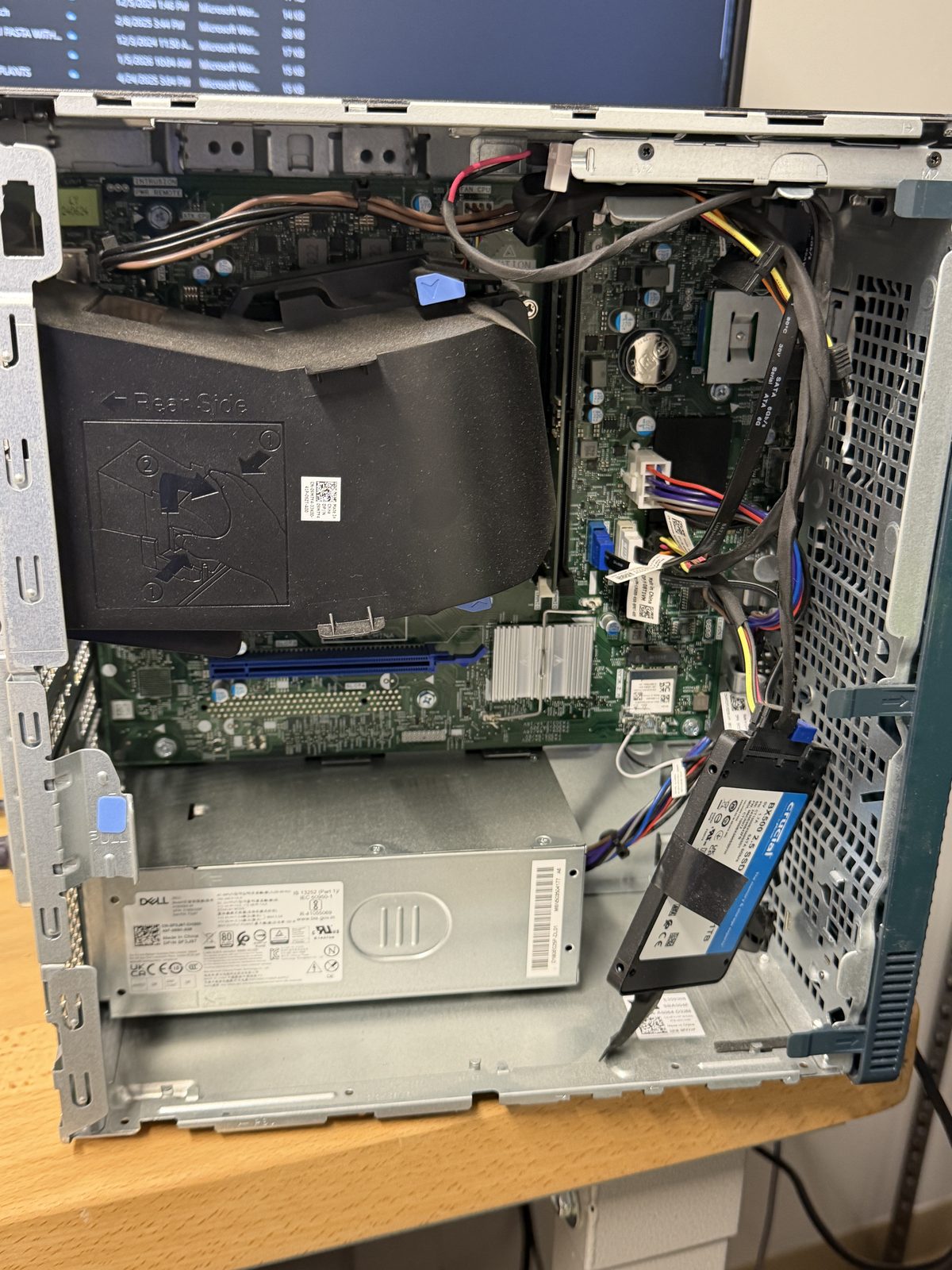
When I pulled the side panel off, the source of the noise was obvious. The second drive, a 1TB Crucial SSD, was taped to the inside of the case. Not mounted in the drive bay that Dell builds into every one of these towers. Not screwed into a bracket. Taped. And the tape had let go, so the drive was swinging from its SATA cable and knocking against the chassis.
An SSD has no moving parts, so a loose drive will not destroy itself the way a spinning hard drive would. But a drive dangling by its data and power connectors puts stress on the SATA ports, and one good bump can crack a connector or yank a cable loose. Then you go from a working computer to a machine that will not boot, and possibly a data recovery job. Every Dell tower like this one has a proper 2.5 inch mounting point. Using it takes about two minutes and one screwdriver.
The OneDrive Mess: A Whole User Profile Dumped Into the Cloud
The second problem was the customer's files. Somewhere along the way, an entire user profile folder was copied straight into OneDrive instead of being migrated the right way. Desktop files were not in Desktop. Documents were not in Documents. Everything the customer owned was scattered across duplicate folders, and they could not find anything they needed for work.
A proper data migration puts Desktop into Desktop, Documents into Documents, and Pictures into Pictures, so OneDrive syncs cleanly and the customer's computer works the way they expect. Copying a raw profile folder into the cloud is the fast way, not the right way. It technically moves the data, but it leaves the customer with a filing cabinet that got dumped on the floor.
Why This Happens at Big Box Repair Counters
I am not saying every technician at a national chain is careless. Plenty of them know their stuff. The problem is the model. High volume, tight time quotas, and constant turnover mean the person working on your computer may never see you or your machine again. There is no reason to take ownership of the result, because there is no relationship behind it.
When you drop a computer off at my shop, I am the one who opens it, I am the one who fixes it, and I am the one who hands it back to you and answers for the work. That accountability changes how the job gets done.
How I Handled It
No drama here. I told the customer I would take care of both issues. The SSD is getting mounted properly in the drive bay with screws, the way Dell intended. The OneDrive account is getting reorganized so Desktop, Documents, and Pictures land where they belong and sync correctly going forward. When this tower leaves my bench, nothing inside it will be held together with tape.
At Dave's Computers, I would never let work like that leave the shop. I treat every PC like it is mine, because my name is on the door and my customers come back.
Bring It to a Local NJ Shop That Stands Behind the Work
If a big box repair left you with loose parts, missing files, or a OneDrive account you cannot make sense of, bring the machine to me. I have been repairing computers in Somerville since 2011, and I personally handle every repair for customers across Somerset, Hunterdon, Middlesex, and Mercer counties.
My diagnostic is $75, and it is credited toward your repair. Drop off your computer at 75 N Bridge St, Somerville, NJ 08876, or call (908) 428-9558 with any questions. You can also learn more about my computer repair services in NJ.